Getting Started — KartComms
Documentation V1.2 Updated 26 March 2026

Getting Started
with KartComms

Everything you need to install, pair, and get your system ready before your next session. Follow the steps in order.

KartComms Premium Kit — Headset, 2 Modules, Case

Premium Kit — What's Included

Your Complete Pit-to-Driver System

1
KC-PRO HeadsetPit-side — team manager, coach, or mechanic
2
KC-PRO Modules × 2Helmet-mounted — one per driver position
3
Protection CaseHard-shell carry case for the full system
01
Before the Track

Charging & Preparation

Charge all modules the night before. A full charge covers a complete race day.

1
Connect via USB
Use the original USB cable included in the kit. Connect to any USB power source.
2
Watch the LED indicator
KC-PRO button glows red while charging. Turns blue when fully charged and ready.
3
Charge all modules
Repeat for every module in your kit. For endurance racing, charge a full backup set as well.
4
Pack the Protection Case
Store everything in the case until you arrive at the track. No further setup required.

LED status reference

Charging in progress
KC-PRO — red
Fully charged
KC-PRO — blue
Use the original cable only. Third-party cables may not charge correctly or could damage the module.
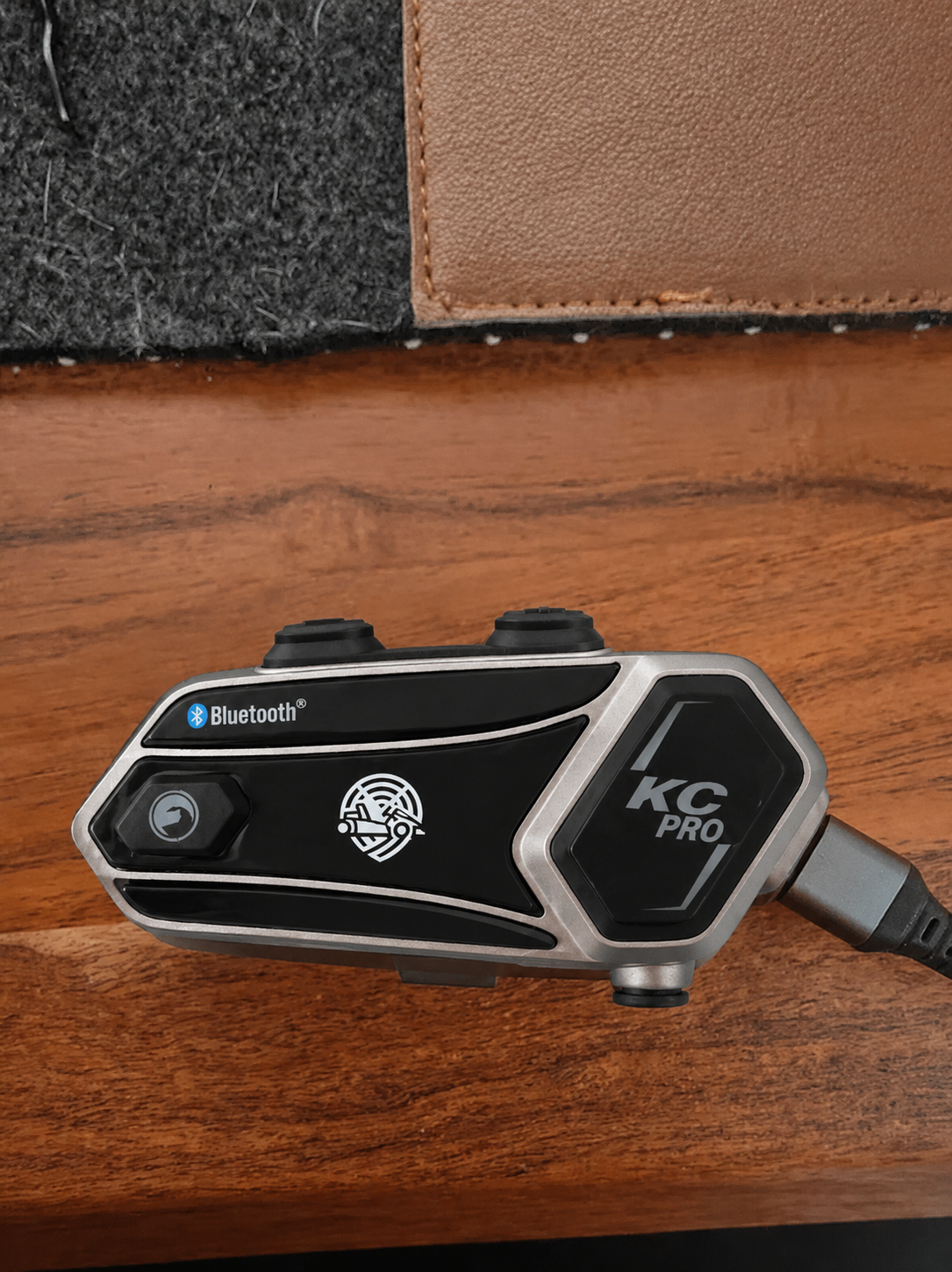
KC-PRO Module charging via USB
KC-PRO Module · USB charging · up to 6h runtime
Battery life: Up to 6 hours of continuous runtime per full charge — sufficient for practice, qualifying, and race day combined.
02
Pit-Side Setup

Headset Setup

No configuration needed. Attach a module, adjust the fit, and you're ready.

1
Slide module into the holder
Locate the built-in module holder on the KC-PRO Headset. Slide one KC-PRO Module into the slot from above.
2
Lock until you hear a click
Push the attachment clip forward until you hear a clear click. This confirms the module is locked. Do not use without confirming the click.
3
Fit and adjust the headset
Adjust the headband until both ear cups fully cover your ears, blocking track noise.
4
Position the boom microphone
Bend the mic to sit 2–3 cm from your mouth. Correct placement is the biggest single factor in call clarity in a loud pit environment.
No app, no wires, no configuration. Once the module is attached and locked, the headset is fully operational.
KC-PRO Headset worn in pit lane
KC-PRO Headset · module attachment + mic position
03
Module Communication

Pairing the Modules

Do this once on first use. Daily reconnection takes seconds after the initial pairing.

Step 1 — Power On

Hold Helmet + KC-PRO button
Press and hold both buttons for 3 seconds. Release once the module powers on.
KC-PRO button layout Button layout diagram
KC-PRO Module — button locations

Step 2 — Reset Pairing (First Use)

Hold Volume+ + KC-PRO button
Hold for 5 seconds. LED flashes purple, then alternates red / blue. Repeat on every module you want to pair.
Clears any prior pairing. Recommended before first use.

Step 3 — Initiate Pairing

Module A — Pit Side
Hold the small helmet button for 3 seconds. KC-PRO button starts flickering.
Module B — Helmet
Repeat on the second module. When paired, both show a slow fading blue — communication active.

LED status during pairing

Reset initiated
brief purple flash
Ready to pair
red / blue alternating
Paired — communication active ✓
slow fading blue

Daily Reconnection

Once paired, daily reconnection is simple:

1
Power on both modules
Hold Helmet + KC-PRO button for 3 seconds on each module.
2
Short press the helmet button on each
Modules find each other and reconnect automatically. Both show fading blue within seconds.
04
Best Practices

Quick Tips for Best Performance

Apply these before every session for consistent, clear communication on race day.

Charge the night before

Never rely on a partial charge. Fully charge every module the evening before your event without exception.

🔒

Confirm the click

Always verify the module is locked before use. An unsecured module can disconnect mid-session.

🎤

Position the mic correctly

Keep the boom mic 2–3 cm from your mouth. This is the biggest single factor in pit-lane call clarity.

📡

Test before going out

Do a voice check before the driver leaves the garage. 30 seconds of testing saves an entire session.

🧱

Keep the module exposed

Do not cover the module with thick tape or padding — this can reduce signal quality and block controls.

🧳

Store in the Protection Case

Pack the full system into the hard-shell case after every session to prevent transit damage.

05
Long Events

Endurance Race Setup

For multi-driver and 24-hour events, use fixed pairs and the battery rotation system below.

Fixed Pair Method

Pit Side
KC-PRO Headset
Module A
Paired ↔
On Track
Driver Helmet
Module B

Keep each module pair linked together. Do not mix modules between separate pairs.

Driver Swap Procedure

1
Remove module from headset
Detach Module A from the KC-PRO Headset at the pit wall.
2
Mount on new driver's helmet
Attach Module A to the helmet of the driver entering the kart.
3
Retrieve from returning driver
Remove Module B from the driver finishing their stint.
4
Reattach to headset
Mount Module B back onto the KC-PRO Headset. Communication restored immediately — no re-pairing needed.

Battery Rotation — 24-Hour Events

Swap to a fresh charged pair every 4–6 hours to maintain uninterrupted communication.

TimeAction
0h – 6hPair A in use
6h swapSwitch to Pair B · Charge Pair A
12h swapSwitch to Pair C or recharged Pair A
18h swapRotate to next charged pair
FinishAll pairs recharged and stored
This method has been used in full 24-hour endurance events. Always have at least one spare charged pair available before each rotation window.
Karting team in endurance pit lane Endurance race photo — karting pit lane
Endurance racing · driver swap · real race conditions
06
Common Questions

Frequently Asked Questions

Not answered here? Contact the KartComms team directly.

The KC-PRO Module is designed for universal compatibility with virtually any karting helmet. It mounts externally and requires no helmet modifications. Contact the team if you are unsure about a specific model.
KartComms is engineered specifically for karting environments — not adapted from a motorcycle or industrial product. The system is built to deliver clear audio in loud, high-vibration race conditions.
For multi-driver endurance events, run multiple fixed pairs. Each pair operates independently on its own link. The Premium Kit includes one pair (two modules). Additional KC-PRO Modules are available separately.
The KC-PRO Module is designed with real race conditions in mind, including wet weather racing. For specific IP rating details, see the product specification page or contact KartComms support directly.
Perform a full reset on both modules: hold Volume+ and the KC-PRO button for 5 seconds. Power off, power back on, then repeat the pairing step from Section 03. If the issue persists, email shop@kartcomms.be.
Use the battery rotation method in Section 05. Prepare two or three fully charged pairs before your event and rotate every 4–6 hours. Each discharged pair recharges fully within the next rotation window.
No. KartComms is fully plug-and-play. No app, no software, no ongoing configuration required. The only setup is the one-time module pairing described in Section 03.

Still have a question?

The KartComms team is available via email or the contact page.

shop@kartcomms.be